Embedded Linux
When someone says that they are using Linux, the first thought that usually comes to mind is a picture of someone glued to the terminal screen, entering magic spells. The word Linux is such a wide term nowadays that it can be interpreted in many ways. Each Linux distribution has its purpose. We can find them on a home computer, where we use it for general purpose usage, on a fridge screen where it tries to show you what is currently on the shelves and sends notifications to your phone when the milk is out, or it can coordinate the server when you are trying to watch the latest episode of your favorite series.
The beauty of Linux is not its variety, but rather its modular architecture, which allows you to take the core and with other components build upon that a system that is tailored to your needs. Not much, not less.
By specifying Embedded Linux, we have in mind specific usage of the system. Surely not a system that is for general purpose, but rather one that has a strict goal to achieve and must do it well. Embedded Linux is found on every device that is not your home laptop/PC, but is dedicated hardware created to achieve a certain goal. This can be a smart-fridge controller, parking gateway controller, smart door camera, etc. Those devices are designed to be robust and built at huge scale with cost reduction in mind.
Constraints applied to hardware mean constraints applied to firmware that the hardware is running. There is no power, memory, or even time to waste.
First atom
When we speak about modularity, first we should define the initial atom that creates the system - it is the kernel.
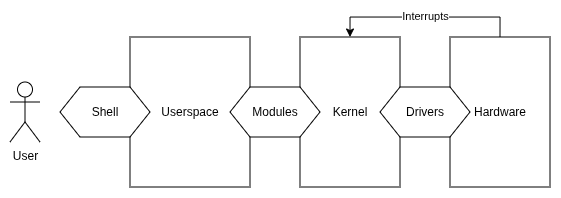
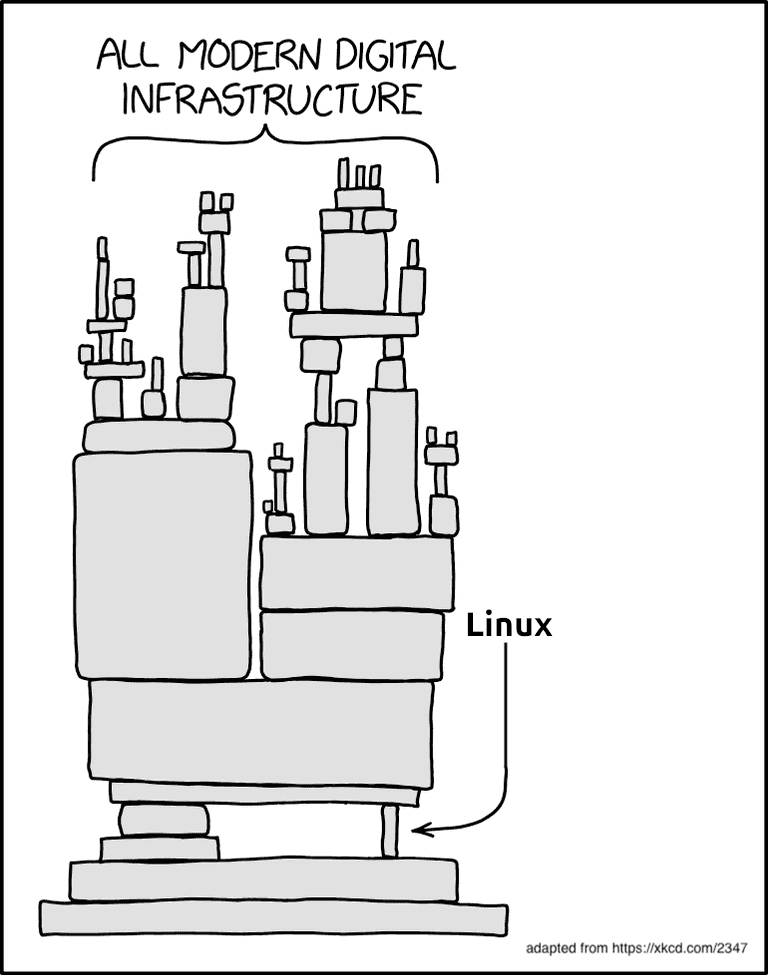
The Linux kernel was created by Linus Torvalds in 1991 as an open-source hobby project. To this day this project is maintained and is the core of the Internet we know now. The kernel itself allows abstracting hardware access to be available for programmers who are creating the system.
When designing hardware which is supposed to execute the Linux
Kernel, we can reuse implementations which are already present in
the kernel sources
“mirror” under the arch/ directory. We will find
there support for many 32-bit and 64-bit CPU architectures. To keep
the portability of the kernel, people are constantly adding, fixing,
and updating this directory, so Linux can be easily run on almost
any CPU we pick for the device. Most of the architectures consist of
a memory management unit (MMU).
Minimal requirements
 The minimal requirements to
run Linux are:
The minimal requirements to
run Linux are:
- MMU (there are other subsets of Linux such as uClinux that do not need MMU),
- 16 MiB RAM (possible even with 8 MiB and 4 MiB when taking into consideration hardcore optimizations),
- non-volatile memory such as FLASH 8 MiB (including NOR and NAND)
- UART port
- JTAG (when the hardware is not capable of running from SD Card)
System blocks
As mentioned at the beginning - the Linux system is built from blocks, which allows it to be tailored exactly to the purpose it needs to fulfill.
- Bootloader
- Kernel
- Device Tree
- Root file system
Each stage is responsible for preparing the device for the moment of executing the final application. The bootloader consists of three stages to load the kernel: the ROM Code, second stage bootloader (SPL), and third stage bootloader (TPL). All three stages of the booting procedure enable the secure boot chain.
After the kernel gets verified and loaded, it proceeds to mount the device tree, which describes the hardware capabilities of the device. Later, the device tree is used to construct the pseudofile file system that allows interaction with the hardware through simple abstraction.
The last stage of booting Linux is mounting the root file system, which is the first application (PID 1) that starts all other processes.
Toolchain
The kernel code is distributed as C source code, which means that we can apply any changes we would like before using it on the device. Such a release strategy also implies that users need to compile the kernel code themselves. When we download common desktop Linux distributions such as Ubuntu or Debian, there are a few common CPU architectures to select from:
- for 64-bit PC (
amd64), - for 64-bit ARM (
AArch64), - for Hard Float ABI ARM (
armhf), - for POWER Processors,
- for RISC-V 64-bit little endian (
riscv64), - for IBM System z.
Selecting the proper image for our architecture saves us a ton of time from recompiling the kernel ourselves. Unfortunately, with embedded Linux it is not that easy, and we need to cross-compile the code for the target platform on our host machine. We can distinguish two types of compilation:
- Native - where the code compilation is targeted for the same device it gets compiled on.
- Cross - where the code compilation is targeted for a different device than it gets compiled on.
Usually our device is not capable of compiling sources on the device to use the native compilation method1, therefore we are forced to prepare a cross-compiler for our host device. To present it more vividly, you can imagine a cross-compiler as a translator for a foreign language who is living in your country. The cross-compiler is part of the toolchain which consists of all tooling necessary to prepare a program for your embedded device.
We can enumerate three main components of the toolchain:
- Binutils - all software that is used to assemble and link binaries that are going to be run on the target.
- GNU Compiler Collection (GCC) - software that is going to be our cross-compiler, a tool that will allow us to translate human-readable code into target machine-understandable code.
- C library - a collection of standardized APIs (POSIX) which allow userspace programs (applications) to interact with the kernel and hardware.
CPU architectures
We mentioned different CPU architectures from which we can select a desktop version of Linux - amd64, AArch64, armhf, riscv64, etc. For embedded devices there are many more possibilities. Embedded device architectures can leverage performance by taking some assumptions at the design stage, such as: power limitation, speed requirements, peripheral support, etc. Therefore we can find different flavors of the same CPU core; e.g., ARM CPUs can be 32-bit, 64-bit, support hardware acceleration for floating point numbers or not. The CPU can support an additional instruction set for handling mathematical computation. The endianness is also critical, because it completely changes how the CPU interprets memory cells. Everything needs to be configured when preparing the cross-compiler for our custom platform. The most important is the convention of passing arguments between function calls, named the Application Binary Interface (ABI).
Application Binary Interface (ABI)
The Application Binary Interface specifies how arguments and return values are passed between function calls. Which CPU registers are used for passing input arguments, which are used for returning the value from a function. This is a global agreement that the application needs to follow to not corrupt data related to other parts of the system.
The processor contains a set of registers that are used to execute logical and arithmetical operations on data. When we call a function in C language:
typedef struct {
    int a;
    int b;
} Pair;

int foo(int x, Pair p, int y) {
    return x + p.a + p.b + y;
}
the compiler must be aware of how to use the CPU registers to transfer the C code into assembly language - into direct instructions that the CPU understands.
Most of the architectures have a common ABI; there is indeed one big difference in ARM architectures, as in the late 2000s to achieve better mathematical operations performance the ABI was changed to Extended ABI (EABI). We can also find EABIHF versions which stand for an interface that supports hardware acceleration for floating-point numbers.
| Aspect | -mabi=aapcs -O0 | -mabi=aapcs-gnu -O0 |
|---|---|---|
| Assembly (Prologue) |
    str     fp, [sp, #-4]!
    add     fp, sp, #0
|
    str     fp, [sp, #-4]!
    add     fp, sp, #0
|
| Assembly (Main Body) |
sub     sp, sp, #20
    str     r0, [fp, #-8]
    sub     r0, fp, #16
    stm     r0, {r1, r2}
    str     r3, [fp, #-20]
    ldr     r2, [fp, #-16]
    ldr     r3, [fp, #-8]
    add     r2, r2, r3
    ldr     r3, [fp, #-12]
    add     r2, r2, r3
    ldr     r3, [fp, #-20]
|
sub     sp, sp, #16
    str     r0, [fp, #-4]
    str     r1, [fp, #-12]
    str     r2, [fp, #-8]
    str     r3, [fp, #-16]
    ldr     r2, [fp, #-12]
    ldr     r3, [fp, #-4]
    add     r2, r2, r3
    ldr     r3, [fp, #-8]
    add     r2, r2, r3
    ldr     r3, [fp, #-16]
|
| Assembly (Epilogue) |
add     r3, r2, r3
    mov     r0, r3
    add     sp, fp, #0
    ldr     fp, [sp], #4
    bx      lr
|
add     r3, r2, r3
    mov     r0, r3
    add     sp, fp, #0
    ldr     fp, [sp], #4
    bx      lr
|
| Key Characteristics |
|
|
GNU encodes the most important information about the toolchain in
the prefix of each tool. This allows distinguishing the
tooling between configurations. It follows the pattern: *
CPU - The CPU architecture, e.g., x86_64
(Intel X86 64bit); in case there is a specification about
endianness, there is an additional eb (big-endian) or
el (little-endian). * Vendor - specifies the
provider of the toolchain. * Kernel - In this case Linux. *
Operating System - Specifies the user space component which
is used, e.g., GNU; this also can come with ABI
specification such as eabihf (extended ABI
hard-float).
You can check your native compiler on your system using:
$: gcc -dumpmachine
x86_64-linux-gnu
C Library
The cross-compiler needs some interface to interact with the underlying system. The C/C++ language has some standard that allows developers to send and receive information to the kernel from userspace. The kernel then can handle all hardware-related tasks and return to the userspace with a response. To establish this interface the POSIX-based standard libc is used.
A simple example for stdlibc function can be a
printf functionality. On the desktop OS, when the
printf is called, we expect to see some characters on
the virtual terminal (pts). On embedded devices we usually do not
have virtual terminals, but instead the connection is based on some
serial connection, e.g., UART.
Underneath the printf function there is a stdlibc
call named putchar, which may or may not have
its default implementation. The putchar function allows
sending a ‘single’ character:
int putchar(int c);Full information about the call can be found using
man putchar
On an embedded device, such a function should have a different implementation than on a standard desktop environment. The implementation can look like this:
int putchar(int c) {
    int status = uart_tx(port_a, c);
    return status;
}
Among those you can find other stdlib functions such as:
exit, abort, getchar, etc.
Not every functionality is needed for an enclosed ecosystem with
memory constraints, therefore different versions of stdlib are
present. The most important ones are:
- glibc - quite heavy on resources library, not designed to be used on constrained systems,
- uClibc - small implementation of only the most important functions, you can fine-tune the library to reduce its size,
- musl libc - standard library which is designed to be used on embedded systems.
The market offers a good open-source toolchain often picked to build your first Linux from scratch - crosstool-ng. The full instruction for preparing your own Linux from scratch can be found on Linux From Scratch.
Booting process
Preparing the device to load a user application is divided into several stages. Each stage is usually supplied by a different vendor. As we mentioned at the beginning, Linux supports dozens of hardware alternatives on which it can be implemented. Taking the variety of suppliers into consideration, it forces the design to take into account different mechanisms of hardware initialization. Each stage must also implement secure code execution in case we are planning to release the device into the market. This means that extra safety standards are enrolled into the booting procedures. Those are known as Secure Boot.
ROM Code
The first stage bootloader that is stored in the Read Only Memory (ROM). The ROM code is the very first piece of code that is executed after powering on the power supply. The initial bootloader has very limited functionality and is unchangeable without remanufacturing the SoC. It is programmed and executed from the system on chip (SoC) silicon itself. The main purpose is to find the second stage (SPL) bootloader, load it into the static ram (SRAM), verify, and execute. The SRAM memory that ROM code has access to is usually very small - 4KiB, therefore the SPL is not going to implement much functionality in its logic.
The SPL is usually stored at the very beginning of the non-volatile memory, such as FLASH. If it is not able to find it, the ROM code can have implemented fallback mechanisms to load code from:
- Serial Peripheral Interface (SPI)
- eMMC card
- Ethernet
- USB
- UART
- etc.
The ROM code is delivered from the vendor of the selected SoC, therefore it knows the most about the internal hardware capabilities of the system.
Secondary Stage Bootloader
After the SPL is booted the main memory needs preparation for execution of the third stage bootloader (TPL). The SPL implements functionality to prepare dynamic SRAM (DRAM) memory space, as the SPL code now has access to a broader address range. Successful memory initialization allows SPL to load TPL, which implements much more features and functionalities relating to device booting. There are many open-source alternatives for TPL implementations. One of those can be u-boot or Barebox.
Third Stage Bootloader
The third stage bootloader now has access to the whole SRAM and DRAM memory, together with the ability to access non-volatile memory where kernel image, together with device tree and initramdisk is stored. The last stage of the bootloader gives much more capabilities related to configuration and even user interaction. The TPL allows accessing a simple shell which can be helpful in device diagnosing, updating, and ensuring the safe secure boot chain.
Kernel
The kernel is the core of the system. People tend to relate to Linux kernel when calling it kernel, but all OSes have their kernels: Windows has its kernel, Zefir, FreeRTOS, etc. Here by kernel we mean the Linux one, developed initially by Torvalds. He created the Linux Kernel as a hobby project in 1991 based on the Minix operating system. He did not create the whole system, as we might imagine using Linux on our laptops and home computers. Instead, he created the core of the system and borrowed GNU components to build a working full-stack OS. This structure has stayed to these days. We build bootloaders, kernel, root filesystem and then we can use it as a full OS.
The core must provide a good level of abstraction for developers to deliver software which is portable across different hardware sets. The kernel gives abstraction above used hardware; it hides all quirks and logic that applies to specific pieces of hardware. Moreover the kernel provides all mechanisms to orchestrate the system with a scheduler, synchronize access to resources, handle hardware interrupts, input/output to other devices and much more.
Because Linux is still very popular, other developers are constantly contributing to the kernel codebase by adding new architectures, fixing bugs, adding new functionalities. The spirit of the GPL-v2 license is to share all code used as a driver to the public domain. This means that any code which runs directly on the kernel level must be open-sourced. Anything which runs in the user-space and just interacts with the kernel through system-calls can be proprietary and is not considered as kernel code.
Root filesystem
The final element after our machine manages to load through bootloaders and execute the kernel is the Root Filesystem. The kernel will mount our root filesystem of choice as ramdisk passed as a pointer from the bootloader, or the kernel will mount a block device (e.g., external memory card) and execute it.
The filesystem is initialized by our kernel and is not expected
to return from the executed piece of code. The first program is in
charge of loading other parts of the system of our choice. The
initial program that starts execution as root and is
usually called init. If I execute ps aux
on my laptop I can search for what program will have PID 1
- this means that it is the first program that my kernel runs on
startup:
USER  PID %CPU %MEM    VSZ   RSS TTY  STAT START   TIME COMMAND
root    1  0.0  0.0  24148 15344 ?      Ss 16:14   0:03 /sbin/init sp
It is indeed the /sbin/init program that initializes
my whole system. Later the init application
forks and creates separate processes, daemons, and
shells to achieve execution of multiple programs at once. The init
process loads configuration files, prepares device nodes, sets up
pseudo filesystems, loads kernel modules and loads shared libraries
into memory so programs can take advantage of those at runtime. In
the Linux environment we have two major programs that orchestrate
the root file system bootup: SysV and SystemD.
Those two applications have major differences in their designs, and
to select which one to use in your system you need to take into
consideration the system’s needs.
The most minimal and often picked root filesystem for embedded purposes is BusyBox, but you will also find distributions like OpenWRT, Debian, etc. Each of those distributions will have its own way of implementing shell, utility programs and management of external peripherals.
The most crude and basic directory layout includes:
/bin: programs essential for all users/dev: device nodes and other special files/etc: system configuration/lib: essential shared libraries, for example, those that make up the C library/proc: the proc filesystem/sbin: programs essential to the system administrator/sys: the sysfs filesystem/tmp: a place to put temporary or volatile files/usr: as a minimum, this should contain the directories /usr/bin, /usr/lib and /usr/sbin, which contain additional programs, libraries, and system administrator utilities./var: a hierarchy of files and directories that may be modified at runtime, for example, log messages, some of which must be retained after boot
~Mastering Embedded Linux Programming
To show one huge difference between the abovementioned
distributions we can take a look at how BusyBox implements the
utility programs such as cat, less, etc. Usually when you take a
look at the /bin folder you will find each binary for
each available utility tool. BusyBox has symbolic links to one
binary /bin/busybox which gets parameterized by the
tool name the user issued. This was done to reduce memory footprint,
which makes the whole distribution fit in 1.4 MB.
References
- Simmonds, C. Mastering Embedded Linux Programming (3rd ed.)
- Wikipedia - Linux Kernel